Summary
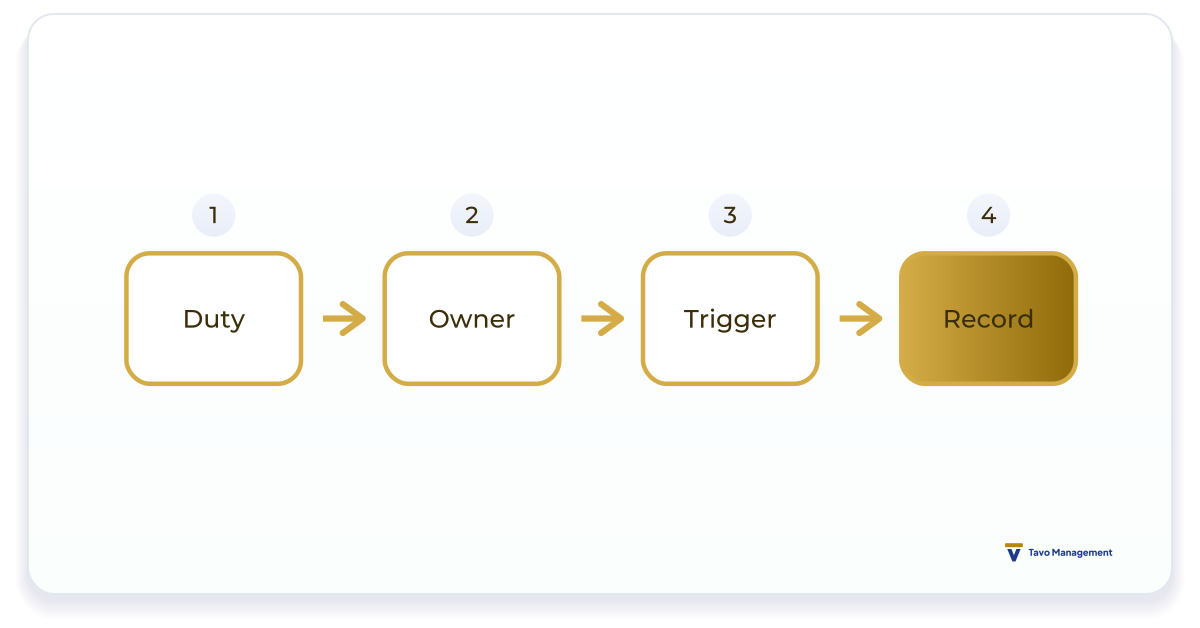
- Good routines are small: one duty, one owner, one trigger and one record.
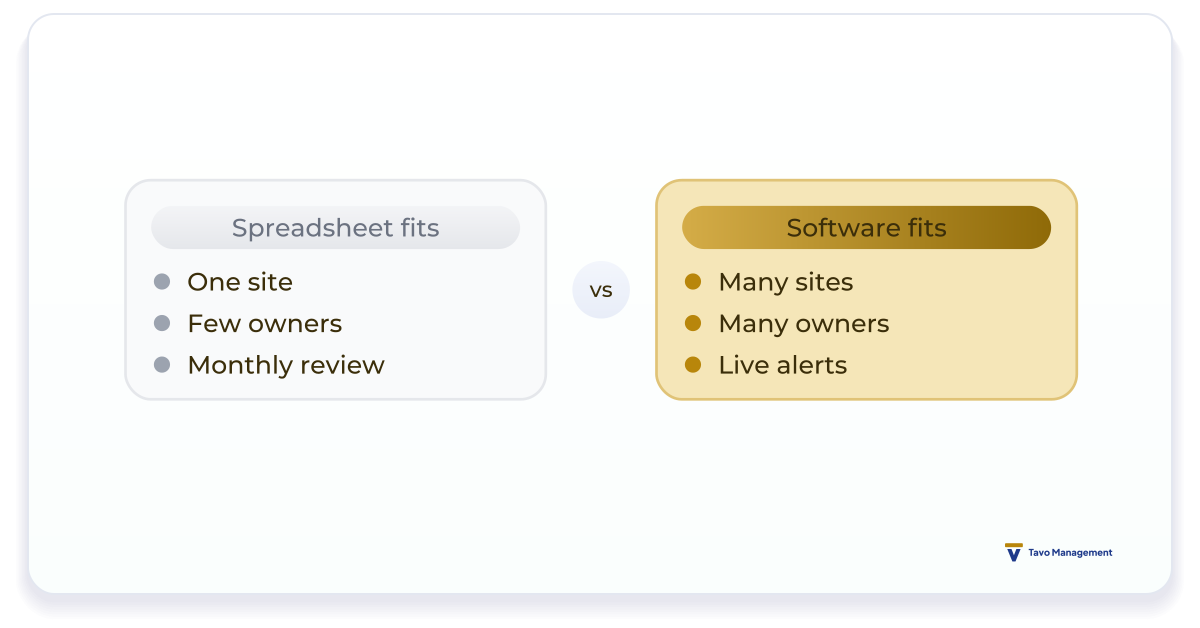
- Most start in a spreadsheet, a folder or a paper checklist, and software comes later.
- Evidence should appear as a side effect of the work, not as a separate task.
- Add no more than three new routines per owner per quarter.
Compliance advice often stays abstract. Here I describe ten routines that businesses run, with the steps behind them. They come from my work with healthcare groups, manufacturers and service firms, and I changed identifying details. Most fall under the structure I set up in compliance management consulting projects.
Use them as patterns. Take the one that fits your highest-risk duty, adapt the steps and test it on one real case before you roll it out.
What the Ten Routines Have in Common
Every routine below has the same bones: a duty, an owner, a trigger that starts the work, steps that fit into the normal workday and a record that proves it happened. Compare them in the table, then read the ones that match your business. If you want the structure behind them, my compliance management framework guide explains where each one fits.
| Example | Industry | Core control |
|---|---|---|
| 1. Credential and License Tracking | Healthcare | Dated register with 90-day alerts |
| 2. Supplier Requirement Matrix | Manufacturing | Requirements mapped to each supplier contract |
| 3. Contract Obligation Register | Professional services | Key clauses extracted into one list |
| 4. Daily Safety and Records Checklist | Dental practice | Short checklist signed off each day |
| 5. Policy Attestation Cycle | Financial services | Annual sign-off tied to role |
| 6. Role-Based Training Matrix | Retail | Training by role and topic with due dates |
| 7. Driver and Vehicle Document Control | Logistics | Expiry-driven checks before dispatch |
| 8. Audit-Ready Evidence Folders | Hospitality | One folder per duty, filed as the work happens |
| 9. Incident Log With Root Cause | Property management | Every incident closed with a cause and a fix |
| 10. Quarterly Internal Spot Checks | Multi-site operations | Independent sample checks of high-risk duties |
Ten Routines You Can Adapt
Each routine lists the steps and the tools that carry it. I put no promises on results here, because outcomes depend on how well the owner runs the routine. Where rules apply to your situation, check with your counsel.
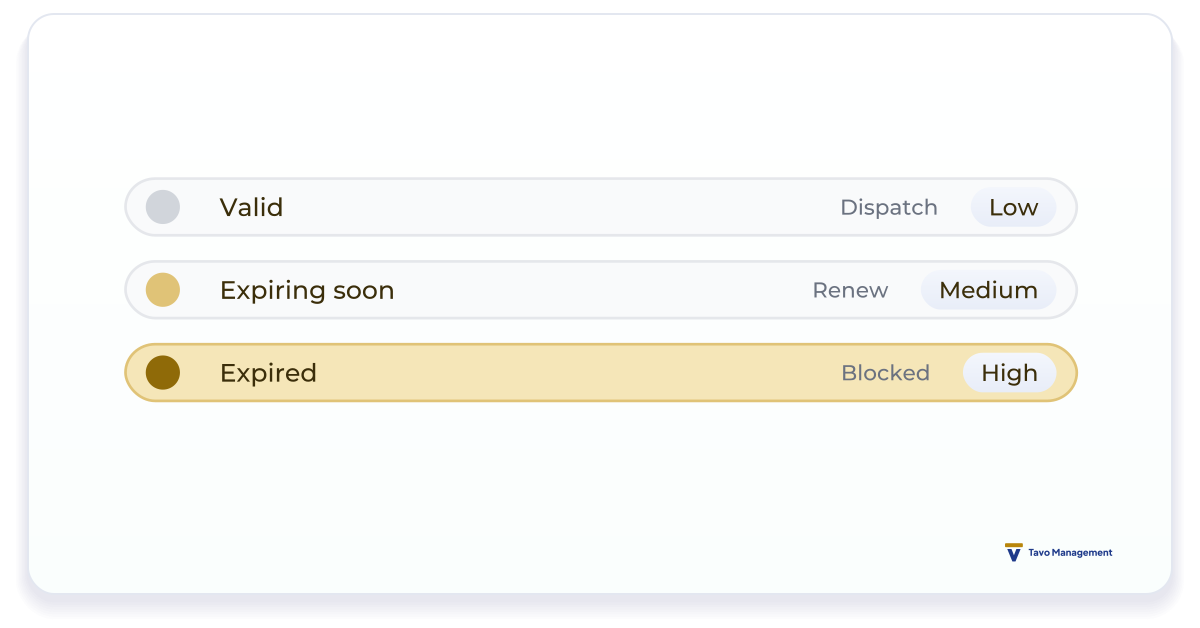
Several routines end in a simple status per item, which keeps the daily check fast for the owner.
Credential and License Tracking
A group of clinics I worked with tracked clinician licenses in personal calendars. One lapsed renewal meant a clinician could not see patients for a week. The fix was a single register of every credential, with expiry date, owner and the document itself attached. Alerts go out 90, 60 and 30 days ahead to the clinician and the practice manager.
The routine works because two people see every date. When a renewal needs fees or exams, the manager sees it three months out, and nothing depends on one person remembering.
How the routine runs
- List every credential with issuer, number and expiry date.
- Attach a scan of the current document to each row.
- Set alerts at 90, 60 and 30 days.
- Name the clinician as owner and the manager as backup.
- Review the full list quarterly and remove leavers.
What carries it
A spreadsheet with calendar reminders covers a small clinic. Larger groups often use the credentialing module of their HR or practice system.
Supplier Requirement Matrix
Customers push obligations down the supply chain: certifications, material declarations and audit rights. A manufacturer I worked with found these scattered across forty supplier agreements. We built a matrix with suppliers in rows, requirements in columns and a date for each last confirmation.
Gaps jump out immediately: a supplier missing a declaration, or a certificate that expired. Procurement owns the matrix and sends a standard request each year, and quality reviews the answers.
Steps from list to alert
- List the requirements your customers and rules place on suppliers.
- Map each requirement to the suppliers it applies to.
- Request evidence with a standard form and a deadline.
- Log responses and flag gaps in the matrix.
- Escalate repeated gaps to the sourcing lead.
Where to run it
A shared spreadsheet is enough for a few dozen suppliers. Supplier portals help once the number grows into the hundreds.
Contract Obligation Register
Customer contracts hold promises that rules never mention: response times, data handling, insurance minimums, audit rights. A consulting firm I know discovered that three contracts required notice before changing a subcontractor, and nobody had tracked it.
The register lists each contract with the clauses that create duties, the owner and the next date. New contracts pass through it before signature, so promises are checked against what the firm can actually deliver.
Setting up the matrix
- Pick the clause types that create duties, such as notice, reporting and insurance.
- Read each active contract and record the clauses.
- Assign an owner and a date to every duty.
- Add a pre-signature check for new contracts.
- Review the list when a contract renews or changes.
Tools to use
Start with a spreadsheet. Contract management tools can read clauses automatically once your volume justifies the cost.
Daily Safety and Records Checklist
A dental group set up a one-page opening and closing checklist for each surgery: sterilization logs, equipment checks, waste handling and consent forms. Each item has a tick box and a name. The practice manager reviews a sample each week.
The checklist lives where the work happens, on a clipboard by the sterilizer, and the signed pages become the evidence. Nobody writes a report at month end. When an inspector asks, the pages are filed by date.
Putting it in place
- Write the daily tasks with the team who performs them.
- Cut the list to what must be done every day.
- Print it and place it at the point of use.
- File signed pages weekly.
- Review a sample and raise gaps in the team meeting.
What you need
Paper works well. Practice software with digital checklists adds time stamps and reminders.
Policy Attestation Cycle
Policies matter only if people read them. A small advisory firm moved from a shared drive of policies to an annual attestation: each employee confirms the policies that apply to their role, with a short quiz on the two that carry the highest risk.
Completion rates are tracked weekly, and managers see who is outstanding. New hires attest during their first week. The result is a dated record of who knew what and when.
Running the cycle
- Map each policy to the roles it applies to.
- Send role-specific lists instead of the full library.
- Add a short quiz for the top-risk policies.
- Chase outstanding sign-offs weekly.
- Store results with dates for the audit file.
Which tools help
A form tool with a spreadsheet works for small teams. Learning platforms and policy management tools track completion automatically.
Role-Based Training Matrix
A retail chain had a yearly all-staff compliance course that people clicked through. We replaced it with a matrix: roles in rows, topics in columns, and a due date in each cell. Cashiers train on payment handling and returns, warehouse staff on safe handling, managers on scheduling and record-keeping rules.
Short modules arrive when people start a role or when a rule changes. Managers see a red cell when a training is overdue, and the matrix doubles as the training record for audits.
Building it step by step
- List roles and the topics each role needs.
- Set a due date and a refresh cycle per cell.
- Build or buy a short module per topic.
- Send modules at onboarding and on change.
- Report overdue cells to managers each month.
Tool options
A spreadsheet can carry the matrix. A learning management system adds automatic reminders and completion records.
Driver and Vehicle Document Control
For a regional carrier, a missing document can stop a vehicle at the roadside. The compliance coordinator keeps driver licenses, medical certificates, insurance and inspection records in one tracker, and dispatch checks the status before assigning a load.
A red status blocks assignment until the document is renewed. It adds a few seconds per dispatch and has removed roadside surprises from the weekly workload.
From document to dispatch
- List documents required per driver and per vehicle.
- Record expiry dates and attach copies.
- Show a status color in the dispatch view.
- Block assignment when a document is expired.
- Send renewal reminders to drivers and managers.
Systems that fit
Fleet management systems usually include document modules. A simple tracker connected to the dispatch sheet works for small fleets.
Audit-Ready Evidence Folders
A hotel group kept food safety and fire safety records in different places across five properties. We set up the same folder structure at each: one folder per duty, subfolders per month, and a naming rule. Managers drop in logs and certificates the same day.
When an inspector or a corporate auditor visits, the manager opens the folder and walks through it. Preparation went from a week of searching to an afternoon of checking.
How to set it up
- Choose a folder layout and a naming rule.
- Create the structure at every property.
- Tell managers what goes into each folder.
- Check one property per month for gaps.
- Fix the layout when a recurring gap shows a design flaw.
Storage setup
Shared cloud storage is enough. Add access rules so only the right managers can edit.
Incident Log With Root Cause
A property company logged incidents, from fire alarm faults to missed inspections, but never asked why they happened. We added two fields to the log: root cause and process fix. A monthly review looks at repeats.
The first review showed that half the missed inspections came from one handover between teams. Fixing the handover removed most of them, and the log became a way to improve the process instead of a record of failures.
Closing each incident
- Log every incident with date, site and owner.
- Record the immediate action taken.
- Ask why until you reach a process cause.
- Assign a fix with an owner and a date.
- Review repeats monthly and close fixes.
What to log it in
A shared spreadsheet or a ticket system with custom fields handles this. The key is the review meeting.
Quarterly Internal Spot Checks
A group with six sites ran its own checks without a shared method. We introduced a quarterly spot check: someone from another site tests two or three high-risk duties by following a real case from rule to record. Each check takes about an hour.
The outside eye finds things that local teams stopped seeing. Results go into the issues log and into the quarterly report, which gives leadership a comparison across sites.
How a check runs
- Choose the high-risk duties to test this quarter.
- Pair a checker with a site from another location.
- Follow one real case from rule to evidence.
- Record findings with severity and owner.
- Share patterns across sites in the review meeting.
Materials for the check
A one-page test sheet and a shared issues log are enough to start.
Choosing Between a Spreadsheet and Software
Almost every routine above started in a spreadsheet, a folder or a clipboard. That is deliberate, because a simple version teaches you what the routine needs. Move to software when you repeat evidence collection often, track many sites or face audits that ask for time-stamped records. My ranking of compliance management software compares ten platforms and what they charge.
Before any purchase, run the routine on a real case for a month. Write down the three things that annoyed the owner. Those become your requirements list.
How to Choose Which Routine to Build First
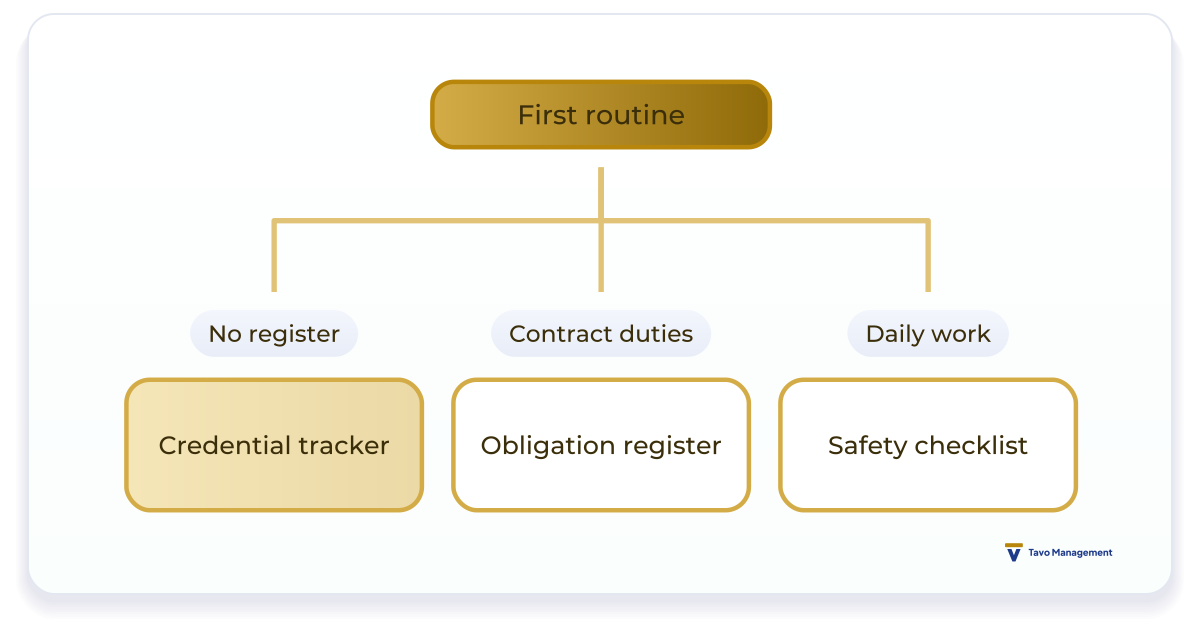
Look at your register and find the duty with the highest cost of a miss and the weakest routine. Pick the example closest to it. If you have no register, the contract obligation register (number 3) or the credential tracker (number 1) is a good first step, because both create a dated list of duties with owners.
Then decide how you will sequence the rest. My compliance management strategy playbook explains the ranking, and the compliance management implementation guide lays out the first 90 days.
Questions About Compliance Management Examples
What Are Good Examples of Compliance Management?
Practical examples include a credential tracker with expiry alerts, a supplier requirement matrix, a policy attestation cycle, a role-based training matrix and a quarterly spot check. Each one gives a duty an owner, a routine and evidence. The ten above show how the same pattern fits different industries.
Which Example Should a Small Business Start With?
Start with the one that addresses your highest-risk duty. For many small businesses that is a dated register of licenses and contract obligations, because a lapsed renewal or a missed notice is cheap to prevent and costly to fix. It also teaches the habits the other examples need.
Do These Examples Need Software?
Most start in a spreadsheet, a shared folder or a paper checklist. Software helps when volumes grow or when audits require time-stamped records. Decide on a tool after you know the routine, and test it against a real case before you buy.
How Do I Adapt an Example to My Business?
Keep the pattern and change the details. Identify the duty, the owner, the trigger and the evidence, then write the routine in your own words with the person who does the work. Test it once on a real case and fix the friction before you roll it out.
How Many Routines Can a Team Handle at Once?
In my client work, three new routines per owner per quarter is a sensible ceiling. More than that and the routines start to slip. Choose the highest-risk duties first and add more as the first ones become habits.
How Do These Examples Connect to a Framework?
Each example is one control inside a wider structure of register, owners, risk ratings, training and monitoring. The framework tells you where each routine belongs, and the routine shows what the framework looks like on a normal workday.
Who Should Own Each Routine?
The person who does the work or is closest to it, not the highest-ranking manager. A clinician owns their credentials, procurement owns the supplier matrix and the site manager owns the evidence folders. A central compliance lead checks that owners are on schedule.
General information only: this is not legal, financial or tax advice. Examples and numbers reflect typical projects; check the specifics with your advisers before deciding.
Did you find this helpful?
Thank you for your feedback.
Delaney Brisco
Delaney leads the Tavo editorial team and works with our consultants to turn real client projects into practical guides on project delivery, process design and organizational change. Before joining Tavo, she spent 12 years in operations and program management roles. She has since edited more than 300 articles on management practice and reviewed PMO setups and process redesigns from over 100 client projects. She is based in Minneapolis, Minnesota.