Summary
- The strongest retail examples fix routine problems: counts, reorder rules, schedules and markdowns.
- Most examples show a first signal within four to six weeks of a pilot in two stores.
- Every example works better with a baseline, an owner and one number to watch.
- Start with stock accuracy, because it makes every other change easier to measure.
Retail management advice tends to stay abstract. Below are eleven examples from my client work, with the steps behind them, so you can see what a fix looks like on the shop floor. They come from retail management consulting projects across clothing, hardware, pharmacy, home goods and convenience stores.
Figures are rounded and come from my clients' own records. Treat them as a range to compare against your numbers, not a promise.
The Eleven Examples at a Glance
| Example | Area | Typical result |
|---|---|---|
| 1. Weekly Cycle Counts for a Clothing Chain | Inventory | Stock accuracy from the low 70s to the low 90s in a quarter |
| 2. Reorder Points for a Garden Center | Inventory | About a quarter fewer stockout days on top sellers |
| 3. Traffic-Based Scheduling for a Convenience Chain | Labor | About 6% less labor cost at similar sales |
| 4. A Markdown Ladder for a Home Goods Store | Pricing | Markdown rate down by about a fifth |
| 5. Return Reason Codes in a Footwear Shop | Returns | Return rate down by about a fifth on the worst products |
| 6. A Six-Number Scorecard for a Pharmacy Group | Reporting | One page replacing a 40-column weekly report |
| 7. Opening and Closing Checklists for a Cafe-Retail Hybrid | Operations | Fewer missed tasks and a faster first hour |
| 8. Click and Collect for a Hardware Store | Omnichannel | Same day pickup within two hours of ordering |
| 9. Protecting High-Theft Products in a Gadget Store | Loss control | Shrink down by about a third on targeted items |
| 10. A New-Store Opening Playbook for a Regional Chain | Growth | Weeks faster to reach the sales of a mature store |
| 11. A Space Reset in a Beauty Retailer | Merchandising | Better sales per foot in the reset categories |
Eleven Retail Management Examples With Steps and Tools
Each example shows what changed, what I saw and how the work runs. The practices behind them are collected in my guide to retail management best practices.
Weekly Cycle Counts for a Clothing Chain
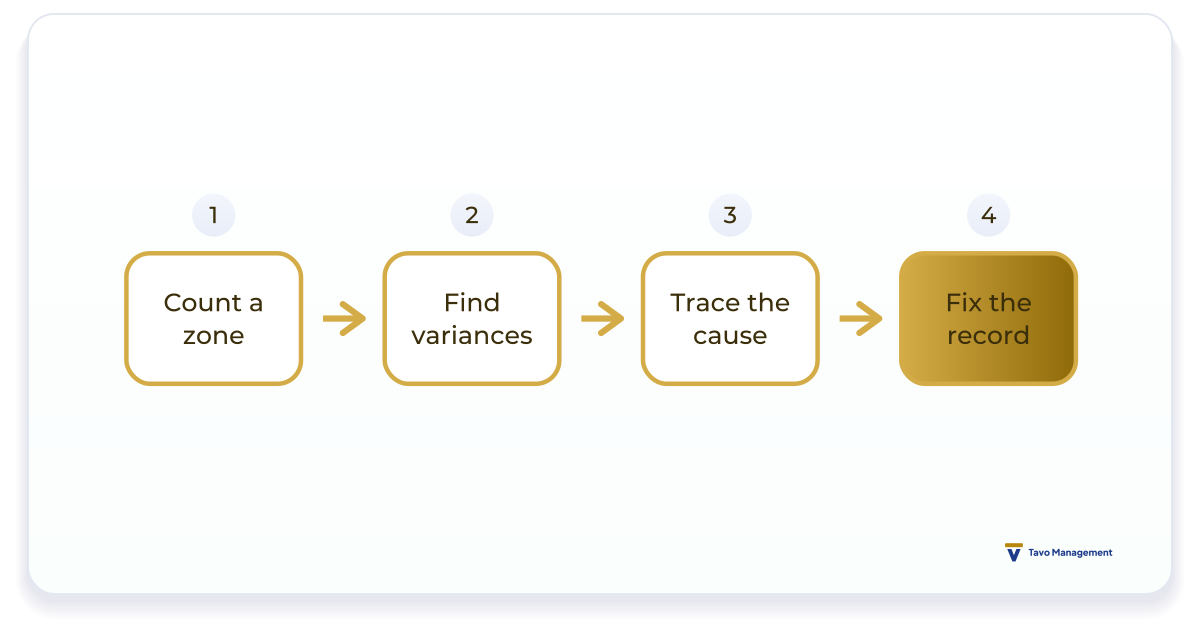
A regional clothing chain with six stores trusted its stock numbers about as far as it could throw the stockroom. Online orders were cancelled for items that were not on the shelf, and managers did not believe the replenishment suggestions. I recommended counting the top 80 products every week and the rest in a rolling monthly cycle, with every variance tagged by cause.
Within a quarter, inventory record accuracy in my client's stores rose from the low 70s to the low 90s in percent, and cancelled online orders dropped by about a third. The biggest cause turned out to be receiving errors at the back door, so the biggest fix was a two-person check on deliveries.
How the Counts Run
- Choose the top 80 products by revenue for each store.
- Assign one counter per store and a fixed weekday.
- Count the sales floor first, then the stockroom.
- Tag every variance with a cause code, such as receiving or mis-scan.
- Review the top three causes in the weekly manager meeting.
- Fix the cause at the source before the next count.
Prerequisites to Run Counts
A handheld scanner or a phone app that works with your point-of-sale system is enough for most stores. Look for counting features inside the system you already use before you buy a separate tool.
Reorder Points for a Garden Center
A garden center had strong seasonal demand and a buyer who ordered from memory. In spring the best sellers ran dry for days at a time. We wrote a reorder point for each of the top 150 products, using last season's weekly sales and each supplier's real lead time.
Stockout days on top sellers fell by roughly a quarter in the first spring, according to my client's own logs. The more useful discovery was that three suppliers quoted lead times a week shorter than what they delivered, so the rules used the measured lead time and not the quoted one.
How the Rules Get Built
- Pull weekly sales for each top product from last season.
- Measure the real lead time from the last five orders.
- Calculate expected demand during the lead time.
- Add a safety cushion sized to how erratic demand has been.
- Set the order quantity to match the supplier's case size.
- Review the rules before each season begins.
Where the Rules Live
Most point-of-sale and inventory systems store reorder points and can raise a low-stock alert. A spreadsheet works for a first season while you learn which numbers to trust.
Traffic-Based Scheduling for a Convenience Chain
A convenience store group scheduled by custom and paid overtime in the evening rush. When we laid sales per hour next to staff hours, three stores were overstaffed before ten in the morning and short between five and seven. The change was moving hours, with no cut in the total.
Labor cost per transaction dropped by about 6% over two months and queue complaints fell. The harder part was people: two long-serving employees lost their favorite shift, so we offered a four-week trial and a say in the new rota, which kept both.
How the New Schedule Comes Together
- Export sales per hour for the last eight weeks.
- Mark the peak and quiet blocks for each weekday.
- Set the minimum cover for opening, peak and closing.
- Build the schedule from the peak hours outward.
- Publish it two weeks ahead and log every swap.
- Compare queue times and conversion after four weeks.
Scheduling Tools
Many point-of-sale and payroll platforms include scheduling that reads your sales history. A shared spreadsheet is enough for a single store if you update the sales-per-hour figures every month.
A Markdown Ladder for a Home Goods Store
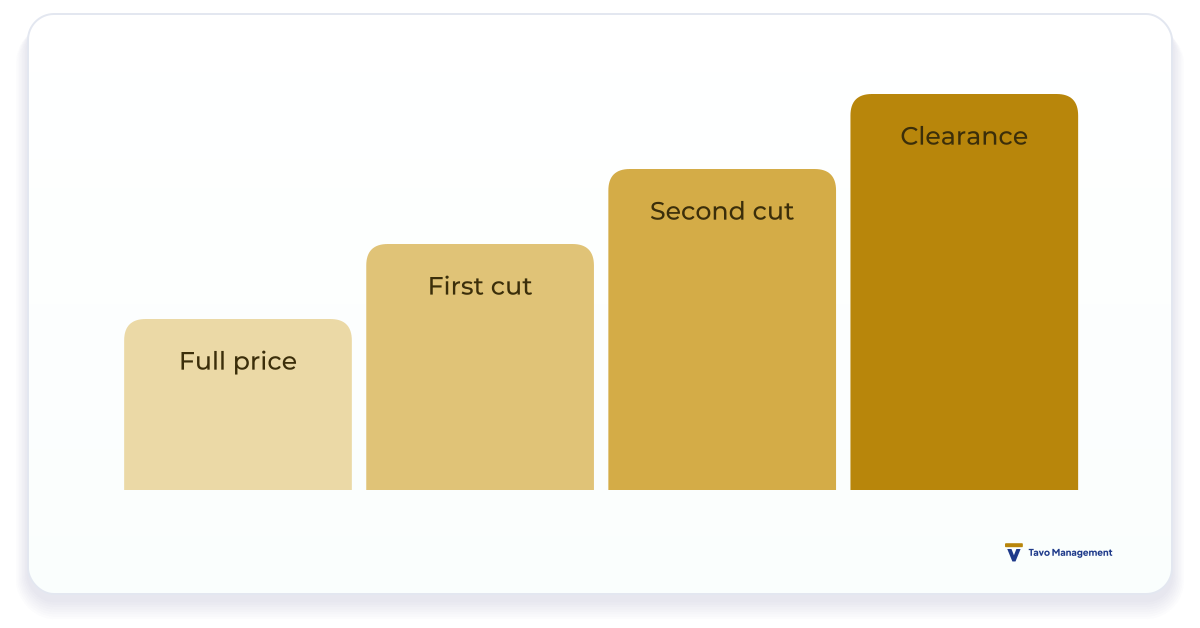
A home goods retailer discounted in panic at the end of each season and gave away margin it did not need to. We replaced the panic with a ladder: 20% off after eight weeks without a strong sale, 40% after twelve and a clearance decision at sixteen weeks.
The overall markdown rate fell by about a fifth, and sell-through improved because stock reached the discount step while demand still existed. Three buyers pushed back on the fixed dates, and we agreed on a short exception list that needed the owner's signature.
How the Ladder Is Applied
- Group products by category and expected shelf life.
- Set the weeks and discount level for each step.
- Mark the next step date on every product in the system.
- Review the list each Monday with the buyer.
- Record exceptions and the reason for each.
- Track markdown rate against net sales every month.
How to Track It
A report of items by age and price in your inventory system is the main input. If your system lacks one, a weekly export to a spreadsheet does the same job.
Return Reason Codes in a Footwear Shop
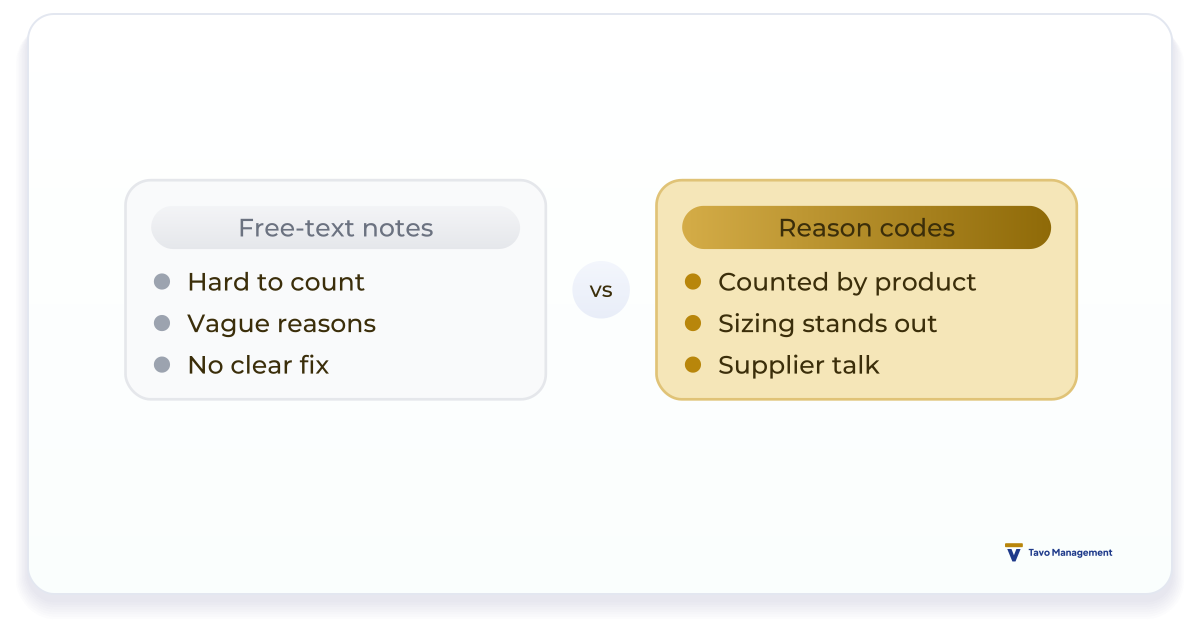
A footwear retailer accepted returns without asking why. Once the till prompted for a reason code, a pattern appeared: three models accounted for most returns, and the reason was sizing that ran small. The product pages and the shelf labels got a fit note, and one model was dropped.
Returns on those models fell by about a fifth, and the return rate overall slipped by a couple of points. The National Retail Federation expects returns of about $849.9 billion in 2025, which shows how much is at stake at national scale, even if your share is small.
How the Codes Turn into Fixes
- Add four to six reason codes to the return screen.
- Train staff to ask the customer, not to guess.
- Export the codes each week with product and store.
- List the five products with the highest return rate.
- Change the product page, label or supplier for each.
- Re-check the rate after six weeks.
Capturing the Reasons
Most point-of-sale systems let you configure return reasons at no extra cost. If yours does not, a laminated code card at the till and a tally sheet will get you started.
A Six-Number Scorecard for a Pharmacy Group
A pharmacy group sent managers a spreadsheet with 40 columns. Nobody read it, so nobody acted on it. We cut it to six numbers: sales against plan, transactions, average basket, labor hours per sale, stockouts on top sellers and shrink, each shown with last week and the same week last year.
The change felt small and worked because of the weekly review that came with it. Each manager answered three questions in a ten-minute call: what moved, why and what will you change. Within two months the managers were quoting the numbers before I did.
How the Weekly Review Works
- Agree the six numbers with the owner.
- Pull them from one source, never from five.
- Show last week and the same week last year.
- Send the page every Monday at the same time.
- Hold a ten-minute review call with each manager.
- Record one action per store and check it next week.
Building the Page
A shared spreadsheet fed by your point-of-sale export is enough to begin. When the format settles, a reporting dashboard can refresh the page automatically.
Opening and Closing Checklists for a Cafe-Retail Hybrid
A shop with a small cafe corner had different opening routines on each shift, so the display and the coffee machine were ready at different times. We wrote a one-page opening and a one-page closing checklist, each with twelve lines and a named owner for every line.
Opening time to full readiness fell from about 50 minutes to about 35, and the morning customers saw the same shop every day. The checklists were tested by a new hire, and the lines she stumbled on were rewritten before launch.
How the Checklist Gets Written
- Watch an actual opening and note every task.
- Group tasks by person and by location.
- Write each line as a short action with a clear end.
- Test the sheet with someone who has never opened the shop.
- Rewrite the lines that caused questions.
- Check the sheet weekly for a month, then monthly.
Making Them Stick
Laminated sheets near the door work, and so do task lists in a simple team app. Whatever you choose, make one person responsible for checking that it is used.
Click and Collect for a Hardware Store
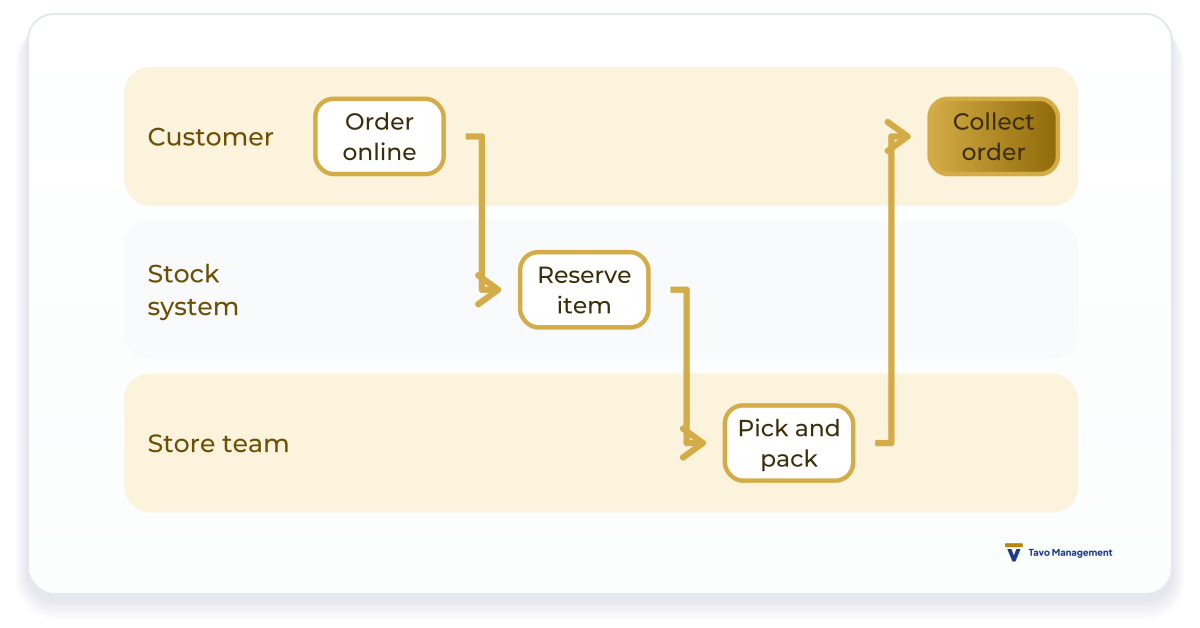
A hardware store wanted to offer online ordering with pickup, but its online stock was a weekly spreadsheet export. The first step was to make the point-of-sale system the single source of stock and let the online shop read from it every fifteen minutes.
With stock feeding the shop, pickup orders were ready within two hours during opening times, and cancelled orders for out-of-stock items almost disappeared. The written rule that a picker must scan every item before the customer is notified solved most of the remaining errors.
How Pickup Orders Are Handled
- Choose one system as the stock source.
- Sync it to the online shop on a fixed interval.
- Reserve stock the moment an order is placed.
- Write a pick, scan and notify routine for staff.
- Set a pickup shelf with clear labels by order number.
- Define what happens when an item cannot be found.
Platform Options
Several retail platforms offer pickup features out of the box. My ranking of the main systems is in the retail software comparison on this site.
Protecting High-Theft Products in a Gadget Store
A gadget accessory store had unexplained shrink on a handful of small, expensive products. Rather than locking up everything, we picked the 15 worst items by loss, moved them behind the counter and counted them every day for a month.
Shrink on the targeted items fell by about a third, and sales of those items stayed flat, because staff were told to offer them rather than wait for a request. The daily count also found a receiving error that explained part of the gap, which no lock would have solved.
How the Targeted Items Are Protected
- Rank products by shrink value from the last two counts.
- Select the 10 to 15 worst items.
- Choose a protection method for each, from placement to tags.
- Count the items daily for four weeks.
- Separate theft from receiving and scan errors.
- Review the list each quarter.
Support from Systems
Exception reports in your point-of-sale system, such as voids and no-sale openings, show patterns at the till. Camera and tag systems come after the process checks, not before.
A New-Store Opening Playbook for a Regional Chain
A regional chain opened its fifth store with a tight deadline and nobody who had done it before. We wrote the opening plan as a checklist of 90 tasks, each with an owner and a date counted backward from opening day, then used it again for the sixth store.
The sixth store reached the weekly sales of an established location several weeks faster than the fifth, because stock, staff and systems were in place from day one. Delays still happened. A permit slipped by nine days, and the checklist showed which downstream tasks to move.
How the Opening Plan Is Built
- List every task from the lease signing to the first week.
- Count dates backward from opening day.
- Assign one named owner to each task.
- Hold a short check-in twice a week.
- Train the team in the store, with stock on the shelves.
- Review the plan after opening and update it for the next store.
Keeping the Plan Visible
A shared project board with due dates is enough for most openings. Add a printed copy to the site office, so contractors and staff see the same list.
A Space Reset in a Beauty Retailer
A beauty retailer had grown its range without changing the shelves, so slow lines took the best space. We ranked the categories by profit per linear foot of shelf and moved the top group to eye level and the main aisle.
Sales per linear foot in the reset categories rose in the following two months, and the staff reported fewer questions about where products were. One surprise came from a slow category that customers used as a landmark. We moved it back, because it helped shoppers find things.
How the Reset Is Done
- Measure shelf space for each category.
- Calculate profit per linear foot.
- Redraw the layout with winners at eye level.
- Reset one store first and track sales weekly.
- Adjust placements based on customer flow.
- Roll the final layout out with a photo guide.
Layout Tools
A simple drawing tool or even paper works for a first reset. Planogram software becomes useful when you run many stores with the same layout.
Estimate Your Own Time Savings
Pick one task your stores repeat each week, such as manual counts, price label changes or report building. The calculator shows what streamlining it could free up. Once a first fix proves itself, the retail management strategy playbook shows how to sequence the next ones.
How Much Time Could You Save?
Move the sliders to match one repetitive task in your business.
How to Choose Your First Retail Management Project
The examples that pay back fastest share four traits. Check your shortlist against them before you commit time:
- The problem shows up in a number you already track.
- One manager can own the change and report weekly.
- You can pilot it in two stores within a month.
- The cost of a mistake during the pilot is small.
If you are new to the topic, my retail management guide explains the terms and how the parts connect. When a tool is part of the fix, the retail management software ranking compares prices and fit.
Questions About Retail Management Examples
What Is the Best Retail Management Example to Start With?
Stock counts and reorder rules, in my experience. They are cheap, they affect sales and cash at the same time and they make every later change easier to measure. A store with accurate stock can pilot almost anything else with confidence.
How Long Does It Take to See Results from These Examples?
Most of them show a first signal within four to six weeks, such as fewer stockout days or a lower return rate. Larger effects, like a lower markdown rate across a season, take a full cycle. Record a baseline before you start so the comparison is honest.
Do These Examples Work for a Single Store?
Yes. Counts, reorder rules, scheduling and checklists work at any size, and a single store can often move faster because there is no rollout to manage. Chain examples such as new-store playbooks only apply when you plan more locations.
Which Example Gives the Quickest Payback?
Markdown ladders and reorder points are usually the fastest, because they change a decision you already make every week. Scheduling comes close when your overtime bill is high. I would avoid anything that needs new hardware for a first project.
How Do I Pilot a Change in My Stores?
Run it in two stores for four weeks and keep two similar stores as a comparison group. Record the same numbers in all four. If the pilot stores improve and the others do not, you have good evidence to roll out.
Can I Do These Myself, or Do I Need a Consultant?
Many are doable in-house if you have a manager with time to own them. A consultant helps when several changes collide, when your data is messy or when you have no one free to lead. The consultants I work with offer a free call, so you can test the fit first.
What If a Pilot Does Not Work?
Treat it as a result. Write down what you expected, what happened and what you learned, then adjust or drop the change. A failed four-week pilot costs far less than a failed rollout, and that is the point of running one.
Sources
General information only: this is not legal, financial or tax advice. Examples and numbers reflect typical projects; check the specifics with your advisers before deciding.
Did you find this helpful?
Thank you for your feedback.
Delaney Brisco
Delaney leads the Tavo editorial team and works with our consultants to turn real client projects into practical guides on project delivery, process design and organizational change. Before joining Tavo, she spent 12 years in operations and program management roles. She has since edited more than 300 articles on management practice and reviewed PMO setups and process redesigns from over 100 client projects. She is based in Minneapolis, Minnesota.